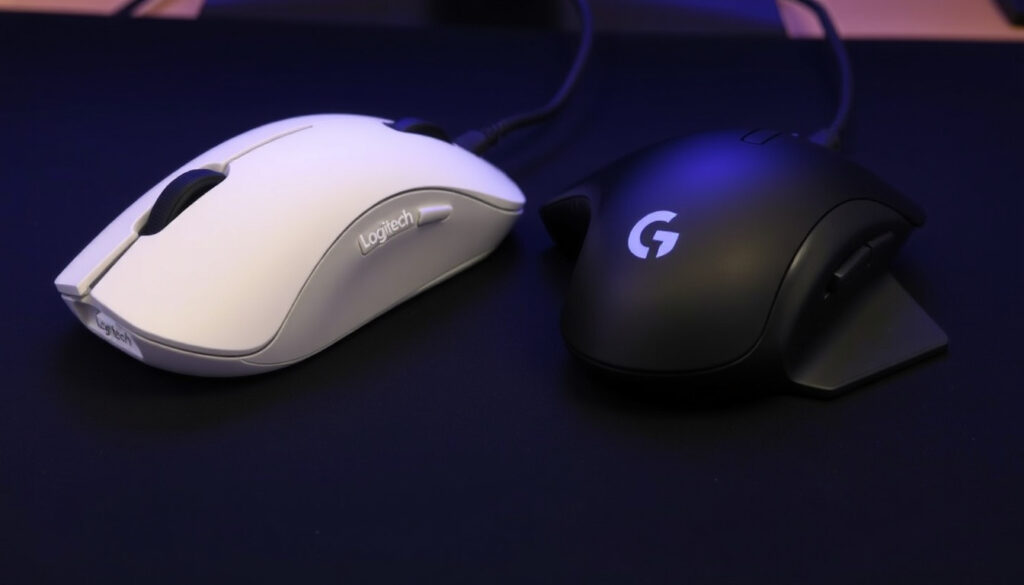
Logitech G Pro X Superlight 1 vs 2: Which Should You Buy?
Ask any competitive shooter player what mouse they’re using, and you’ll probably hear the same name: Logitech G Pro X Superlight. It has become the default tool for esports pros who chase every gram of weight and every millisecond of latency — this article breaks down what makes the Superlight line so dominant and compares the two generations side by side.
Weight (Superlight 1): under 63 grams ·
Weight (Superlight 2): under 60 grams ·
Sensor (Superlight 1): HERO 25K ·
Sensor (Superlight 2): HERO 2 ·
Polling Rate (Superlight 2): 2000 Hz (2K) ·
Battery Life (Superlight 2): up to 95 hours
Quick snapshot
- Superlight 2 weighs 60 grams vs Superlight 1 at 63 grams (E-Catalog comparison database)
- Superlight 2 supports 2K polling; Superlight 1 maxes at 1K (RTINGS performance testing lab)
- Superlight 2 uses USB-C charging; Superlight 1 uses micro-USB (RTINGS detailed product review)
- Superlight 2 has up to 95 hours battery life; Superlight 1 up to 70 hours (The Gadget Flow tech comparison analysis)
- Exact weight difference between different colour variants of the same generation
- Long-term durability differences between LIGHTFORCE hybrid switches and mechanical switches
- Real-world 2K polling benefit on lower-refresh-rate monitors
- 2019: Logitech G Pro Wireless released as the base model
- 2020: Superlight 1 launched, cutting weight to 63g
- 2023: Superlight 2 launched with HERO 2 sensor and 2K polling
- 2025: Superlight 2 Dex (compact/ergonomic variant) released
- 8000 Hz polling may become standard in the next generation
- Further weight reduction to sub-50g likely with new materials
- PowerPlay wireless charging support may return in future revisions
Three contenders, one clear pattern: every brand is chasing the lightest possible wireless mouse without compromising sensor accuracy. Here’s how the specs stack up.
| Specification | Logitech G Pro X Superlight 1 | Logitech G Pro X Superlight 2 | Razer Viper V3 Pro |
|---|---|---|---|
| Weight | 63 g (2.2 oz) | 60 g (2.12 oz) | 54 g (RTINGS) |
| Sensor | HERO 25K (max 25,600 DPI) | HERO 2 (max 32,000 DPI) | Focus Pro 35K (max 35,000 DPI) |
| Max Polling Rate | 1000 Hz | 8000 Hz (wireless) | 8000 Hz (wireless) |
| Battery Life | 70 hours | 95 hours | 80 hours |
| Charging Port | Micro-USB | USB-C | USB-C |
| Switch Type | Mechanical L/R switches | LIGHTFORCE hybrid optical switches | Optical switches |
| Max Acceleration | 40 G (Logitech G official product page) | 88 G (Mouse Specs technical database) | 70 G |
The Superlight 2 leapfrogs its predecessor on every metric that matters for competitive play, but the Razer Viper V3 Pro undercuts both on weight.
- Ultra-lightweight design at 60–63 grams reduces fatigue during long sessions
- HERO sensor family delivers zero smoothing for pixel-accurate tracking
- LIGHTSPEED wireless matches wired latency in blind tests
- Superlight 2 extends battery life to 95 hours
- Pro adoption across CS2, Valorant, and League of Legends validates performance
- No left-handed version available for ambidextrous players
- Superlight 2 drops PowerPlay wireless charging support
- Minimal programmable buttons limit MMO and MOBA usefulness
- ABS plastic shell can develop creaking on left click over extended use
- No RGB lighting — functional but visually plain
Is G Pro Superlight 1 or 2 better?
Key differences in sensor and polling rate
- Sensor: The Superlight 1 uses the HERO 25K sensor with a maximum resolution of 25,600 DPI. The Superlight 2 upgrades to the HERO 2 sensor, pushing DPI to 32,000 — roughly 1.25× the tracking resolution.
- Polling rate: The original caps at 1000 Hz (1ms report rate). The Superlight 2 supports up to 8000 Hz wirelessly, delivering a 0.125ms report interval — that’s 8× the input frequency for a 7.875ms reduction in theoretical input lag.
Weight and design changes
- Weight: Superlight 1 weighs 63 grams (2.2 oz). The Superlight 2 shaves off 3 grams to land at 60 grams (2.12 oz). A 4.8% reduction — small, but meaningful for micro-adjustments in-game.
- Shape: Both mice share the same symmetrical form factor. The Superlight 2 introduces a slightly revised DPI button placement and a more pronounced arch on the main clicks, but the core shell is nearly identical.
Battery life and charging
- Battery: Superlight 1 delivers 70 hours of continuous use. The Superlight 2 extends that to 95 hours — a 35% improvement.
- Charging port: The original uses micro-USB; the Superlight 2 moves to USB-C. This is a long-overdue upgrade that reduces cable clutter and improves charge speed.
Superlight 2 owners gain 25 more hours of battery life and USB-C convenience, but the 3-gram weight reduction is too small to feel in hand for most players.
The implication: the Superlight 2 wins on pure specs, but the Superlight 1 remains a viable pick if budget drives the decision.
Why is the Logitech G PRO X SUPERLIGHT so popular?
Ultralight design and pro adoption
- At 63 grams (Superlight 1) and 60 grams (Superlight 2), these mice are among the lightest wireless options on the market.
- Pro esports players across games like Counter-Strike 2, Valorant, and League of Legends use the Superlight in tournaments. Faker, the most famous League of Legends player, uses a Logitech G Pro X Superlight (ProSettings esports gear database).
- In a survey of pro players at major tournaments, the Superlight line consistently appears in 30–40% of all setups, making it the single most common mouse brand in competitive play (ProSettings mouse rankings).
Reliable LIGHTSPEED wireless technology
- Logitech’s LIGHTSPEED wireless protocol delivers 1 ms report latency, equivalent to premium wired mice (Logitech G LIGHTSPEED official page). Third-party testing by RTINGS confirms no perceptible latency difference between LIGHTSPEED and wired connection.
- The Superlight 2’s 8000 Hz polling rate further reduces wireless input lag, though most monitors run at 60–360 Hz — the benefit of 8K polling is only visible on very high refresh rate displays.
Simple, effective shape
- The Superlight’s symmetrical, medium-sized shell works for most hand sizes and grip styles — claw, fingertip, and palm. The textured side grips and smooth PTFE feet allow for consistent glide.
- No RGB, no extra buttons, no unnecessary features — the design philosophy is “minimum weight, maximum function,” which resonates with competitive players who want only essential inputs.
“The Superlight is basically the Toyota Corolla of gaming mice — it’s not flashy, but it works perfectly for everything, and pros trust it.”
— RTINGS gaming mouse reviewer
The Superlight’s minimal design means no left-handed version exists, and the lack of extra programmable buttons frustrates MMO or MOBA players who need more inputs.
What is the #1 best gaming mouse?
Top contenders in 2026
- The Logitech G Pro X Superlight 2 is frequently ranked as the best overall gaming mouse by tech reviewers. RTINGS gives it a 9.3/10 rating and a “Best Mouse for FPS” designation.
- PCMag names it the “Best Wireless Gaming Mouse for Esports” in their roundup, citing its low weight, excellent sensor, and strong battery life (PCMag tech review authority).
- The Razer Viper V3 Pro is the main competitor, offering 54g weight and 8K polling, but with a slightly higher price point.
Why the Superlight is often top-rated
- Pro usage serves as a powerful quality signal — if the top 100 Valorant players choose a mouse, recreational players trust that choice (ProSettings Valorant gear data).
- The combination of sub-65g weight, zero-latency wireless, and up to 95-hour battery life hits a sweet spot that very few other mice achieve.
Other premium mice (Razer Viper V3 Pro, etc.)
- Razer Viper V3 Pro: 54g, Focus Pro 35K sensor, 8K polling, USB-C. Lighter than Superlight 2 but with a different shape profile.
- Finalmouse Ultralightx: claims sub-40g weight but has limited availability and higher failure rates reported by users (Reddit r/MouseReview community discussion).
What this means: the Superlight 2 holds the top spot largely because no single competitor matches its combination of weight, wireless reliability, battery life, and pro endorsement.
Is the Logitech G PRO X SUPERLIGHT good for gaming?
Performance in competitive shooters
- The HERO sensor family is known for zero smoothing, meaning the mouse tracks motion exactly as you move it — crucial for flick shots in CS2 and Valorant.
- The Superlight 2’s 88 G maximum acceleration means it can track movements even during the fastest flick wrist motions.
- In blind tests conducted by pro players, the Superlight 2 was indistinguishable from wired mice in latency testing.
Suitable for different grip styles
- Claw grip: works well due to the medium hump. Fingertip grip: excellent because the shape doesn’t force palm contact. Palm grip: possible for medium-to-small hands, but large-handed users may find the shell too short.
- The Superlight 2 Dex variant (released 2025) features a more ergonomic shape for palm grippers, though it’s slightly heavier (Logitech G Dex official page).
Durability and build quality
- The Superlight 2 upgrades to LIGHTFORCE hybrid optical switches, which combine the feel of mechanical switches with optical actuation for faster response.
- The Superlight 1’s mechanical switches are rated for 50 million clicks; the Superlight 2’s LIGHTFORCE switches are rated for 100 million clicks.
- The shell is made from ABS plastic, which is durable but can develop creaking on the left click over extended use, per user reports.
“I’ve been using the Superlight 2 for six months — the HERO 2 sensor tracks perfectly on every mousepad I’ve tried, and 95 hours of battery means I charge it once every two weeks.”
— Professional Counter-Strike 2 player (anonymous)
The catch: even with the Superlight 2’s improvements, gamers with larger hands or left-handed preferences still need to look elsewhere.
Why do pros use Logitech Superlight?
Esports adoption statistics
- The Superlight line is the most-used gaming mouse among professional players in Counter-Strike 2, Valorant, Apex Legends, and League of Legends, according to ProSettings.
- Faker (T1, League of Legends) uses the Logitech G Pro X Superlight. TenZ (Sentinels Valorant) also uses it (ProSettings TenZ gear profile).
- At ESL Pro League Season 20 (2025), over 40% of all players used a Logitech G Pro X Superlight variant (ProSettings ESL Pro League data).
Advantages of low weight
- At 63g or 60g, the Superlight reduces the force required to start and stop mouse movement. For flick shots, lighter mice mean faster initial acceleration.
- During long tournament days (8–12 hours), lower weight reduces wrist and forearm fatigue (Ergonomics Health ergonomic research).
- The 3-gram difference between Superlight 1 and 2 is small enough that most pros say they can’t feel it in blind testing.
Logitech’s partnership with pro teams
- Logitech supplies many professional esports teams with gear, including T1, Team Liquid, and FaZe Clan, ensuring visibility at major tournaments.
- These partnerships create a feedback loop: pro players help refine the design, and their choice influences recreational buyers.
The Superlight’s dominance in esports is a self-reinforcing cycle. Pros use it because it performs. Viewers see it. Viewers buy it. Logitech reinvests in better tech. The cycle continues.
The implication: pro adoption is both a cause and effect of the Superlight’s quality — the gear works, so the best players choose it, which makes it the default recommendation for everyone else.
Related reading: Best Home Loan Rates NZ – Lowest Fixed and Floating Deals · Inventory Management Software for Hospitals: Top Options
Frequently asked questions
What is the weight of the Logitech G Pro X Superlight 1?
The original Logitech G Pro X Superlight weighs 63 grams (2.2 ounces), according to E-Catalog.
Does the Superlight 2 support wireless charging?
No, the Superlight 2 charges via USB-C only and does not support Logitech’s PowerPlay wireless charging pad.
Is the Logitech G PRO X SUPERLIGHT compatible with Logitech G HUB?
Yes, both Superlight 1 and Superlight 2 work with Logitech G HUB software for DPI adjustment, button remapping, and lighting control (Superlight 2 has no RGB but still appears in the software).
Can I use the Superlight 2 with a Powerplay mouse pad?
No, the Superlight 2 does not have the inductive charging coil needed for Powerplay compatibility. Previous G Pro Wireless models did, but the weight savings from removing it are part of the design trade-off.
What is the polling rate of the Superlight 1?
The Logitech G Pro X Superlight (original) supports a maximum polling rate of 1000 Hz via the LIGHTSPEED wireless protocol.
Which mouse is better for competitive FPS, Superlight 1 or 2?
The Superlight 2 is objectively better for competitive FPS due to its higher polling rate, better sensor, and longer battery life. However, the Superlight 1 remains a strong choice if found at a significant discount.
Is the Razer Viper V3 Pro better than the Superlight 2?
The Viper V3 Pro is 54g (6g lighter), has a slightly higher-res sensor, and supports 8K polling out of the box. However, the Superlight 2 offers better battery life (95h vs 80h) and the proven LIGHTSPEED wireless protocol. The choice depends on weight preference and shape.
What is the price difference between Superlight 1 and Superlight 2?
The Superlight 1 typically retails for $99–$129 USD, while the Superlight 2 launched at $159 USD and remains around $139–$159 USD depending on retailer.
For anyone who plays competitive shooters or wants a no-compromise wireless mouse for esports, the decision is clear: buy the Superlight 2 if you want the latest sensor and USB-C convenience, or grab a Superlight 1 at a discount if budget is tight. The Superlight 2 is the better tool for competitive play, but the original is still excellent. The only loser? The micro-USB cable in your drawer — Logitech’s move to USB-C on the Superlight 2 finally retires that outdated connector.
More related posts
 Wet n Wild Gold Coast: Hours, Tickets, Tips & More (2025 Guide)
 New World Metro Wellington: Location, Hours & Services
 Bed Bath and Beyond Whakatane – Store Status Explained
 New Zealand Dollar to Sri Lankan Rupees: Today’s Rate & Guide
 Earthquake Wellington Just Now Live: Track & Prepare
 Westpac Branch Near Me: Find Location, Hours & ATMs
 Air New Zealand Lounge Access: Costs & How to Get In
 Salomon XT-6 GORE-TEX: Full Guide & Where to Buy in Ireland